Keypa for offices · getting started

Every home your office touches, in one place.

Keypa is a wallet for a home: the paperwork, the dates and the tradies, kept in order by the homeowner’s phone. The office console is your side of it. Invite clients, see who joined, gift the right moment, and read the homes you manage with the owner’s say-so.

Open the office console

Sign in with the email your office admin added you under. Forgot the password is on the sign-in page.

console · Overview

Keypa in a minute

What your client gets, and why it comes back to you.

A homeowner opens the app once, shows Keypa their home, and from then on it keeps three things straight for them.

Documents

Contracts, certificates, policies, receipts and reports, filed into ten folders by what they are. Anything emailed to the home’s own wallet address files itself.

Reminders

A year’s worth of dates that matter: smoke alarms, insurance renewal, valuations, safety checks, lease renewals. Keypa raises each one when it is due.

Tradies

Quotes, bookings and invoices for work on the home, run by email so nobody has to learn a new app. The record of what was done stays with the home.

Your office is who brought them. Every homeowner who joins through your link or your texts is counted to your office, and the office name and logo sit inside the wallet they use every week.

The console

Five places, one header.

The same menu is on every page: Overview, Invite, Team, Properties and Gifting, with Settings behind the gear beside your gifting balance. Here is what each one is for and what to do there.

Overview

How the office is going, this month.

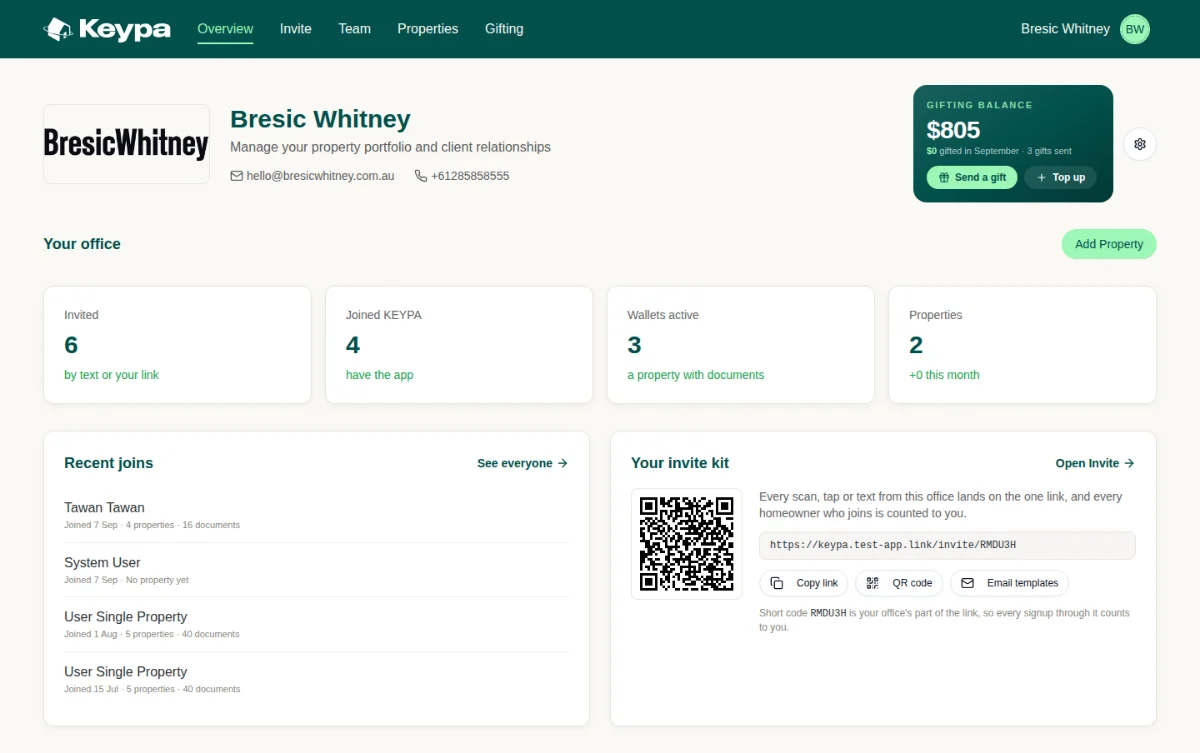
Four numbers tell the story: how many people you have invited, how many joined, how many have a wallet with documents in it, and how many homes the office touches. Below them, who joined most recently, and your invite kit so the link is never more than a click away.

Look for

Wallets active is the number that matters. An invite that becomes a wallet with documents is a client who will keep using it.

The gifting balance in the top corner is shared by the whole office. Send a gift from anywhere; the admin tops it up.

console · Overview
Invite

One link for the office, or a list of mobiles.

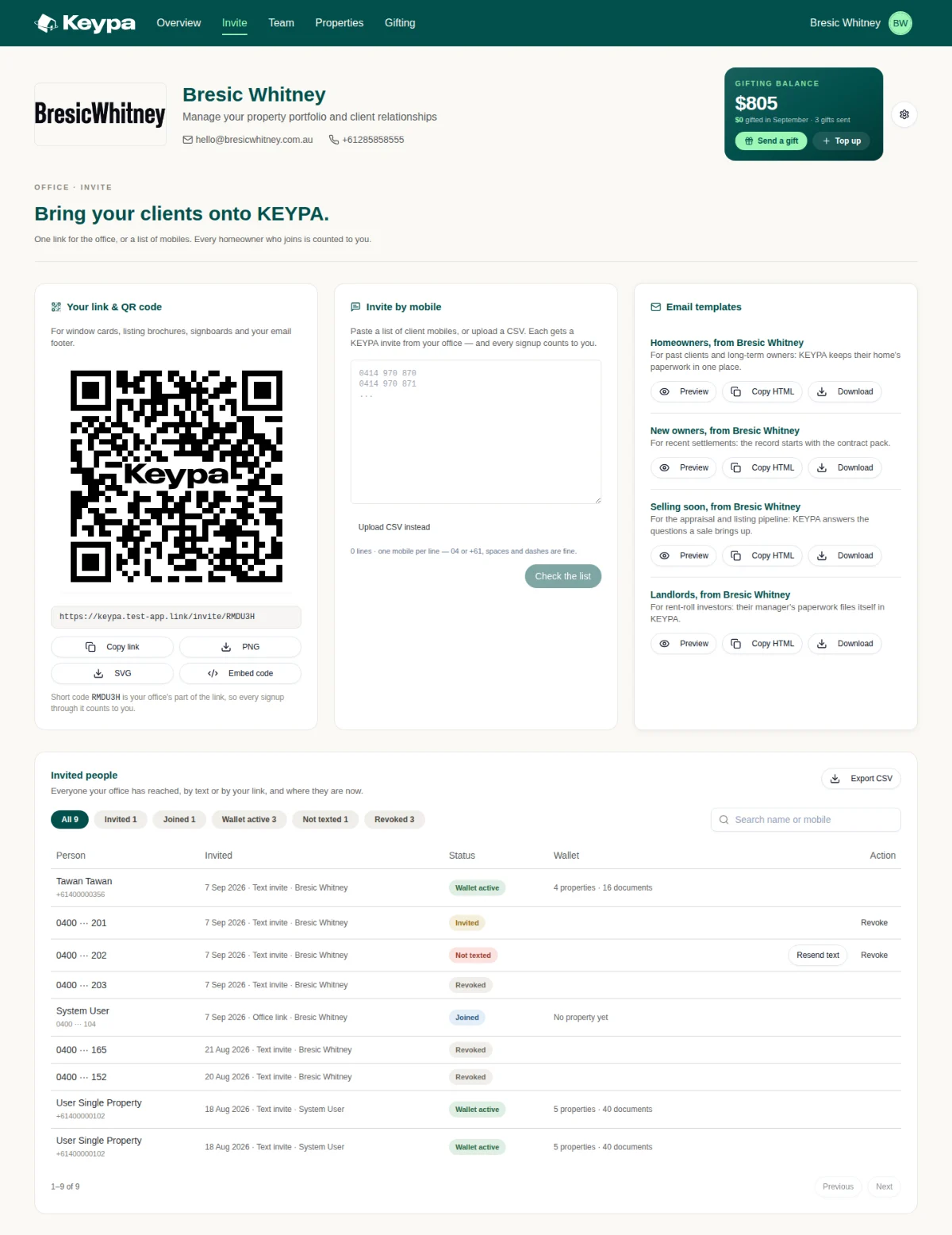
Your office has one link and one QR code. Put it on window cards, listing brochures, signboards and your email footer; download it as PNG or SVG, or copy the embed code for your website. Or paste a list of client mobiles and each one gets a text from your office. Four ready-made emails cover past clients, new owners, sellers and landlords.

Do this

Text your client list. One mobile per line, 04 or +61, spaces and dashes are fine. Check the list, then send.

Watch Invited people. Every person the office has reached, with where they are now: Invited, Joined, Wallet active, Not texted, Revoked. Resend a text that failed; revoke one that went to the wrong number.

Use the email templates in your own mail client. Preview, copy the HTML or download, then send from your address so it lands as you.

console · Invite

Scroll inside the frame to see the whole page.

Team

Everyone in the office, each with their own link.

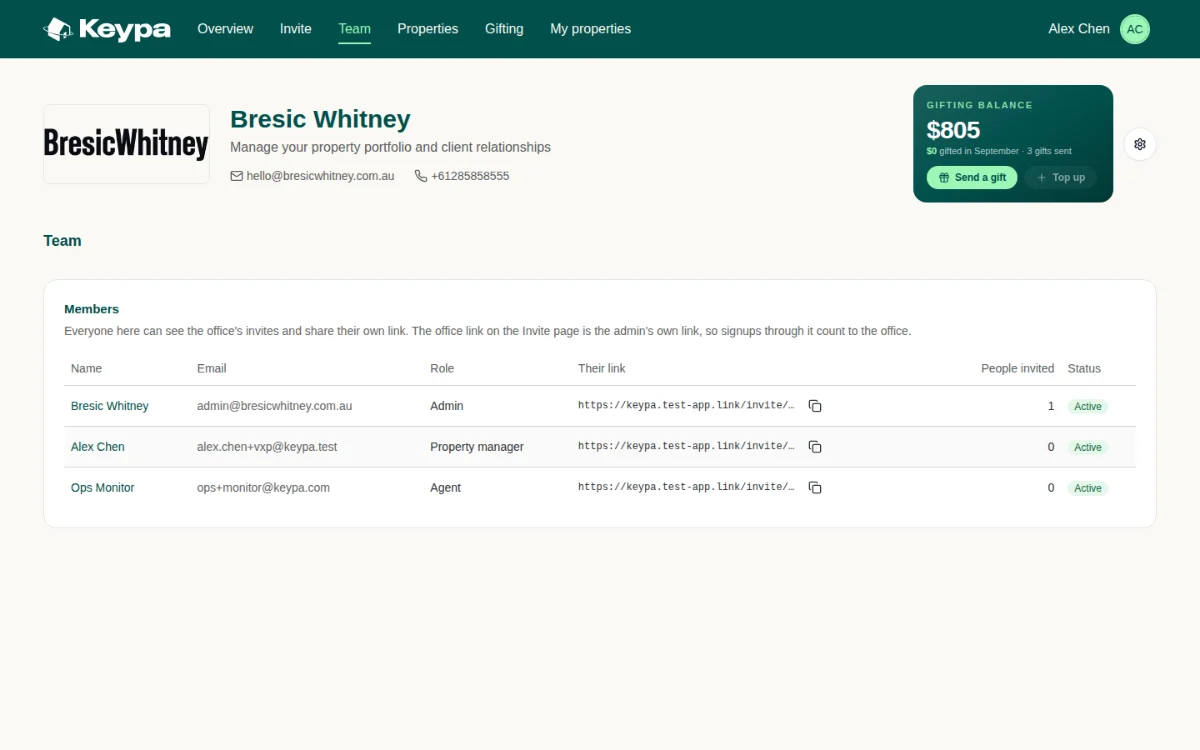
The roster lists every member, their role, their personal invite link and how many people they have brought in. Signups through anyone’s link count to the office; the office link on the Invite page is the admin’s own. Admins add people by email, or from the office’s Domain agent list where the office is linked to Domain.

Do this

Copy your own link from your row and put it in your email signature. It is yours, and it still counts to the office.

Admins: Invite by email. First name, last name, email and a role: Agent, Property manager or Admin. They sign in with that email.

console · Team · as the office admin

console · Team · Invite by email

Properties

Every home the office touches.

Homes you brought onto Keypa and homes you manage, in one list. The Relationship column says which: Referred means the owner joined through your office; Managed means the owner has given your office read-only access to part of their wallet. A home can be both.

Do this

Request access on a home you manage. The homeowner approves it in their app; until then the row reads “Waiting on the homeowner”.

Open a managed home to read it. End access when the management ends. Consent is always the homeowner’s; nothing in this list grants anything on its own.

console · Properties

Gifting

Gift the right moment.

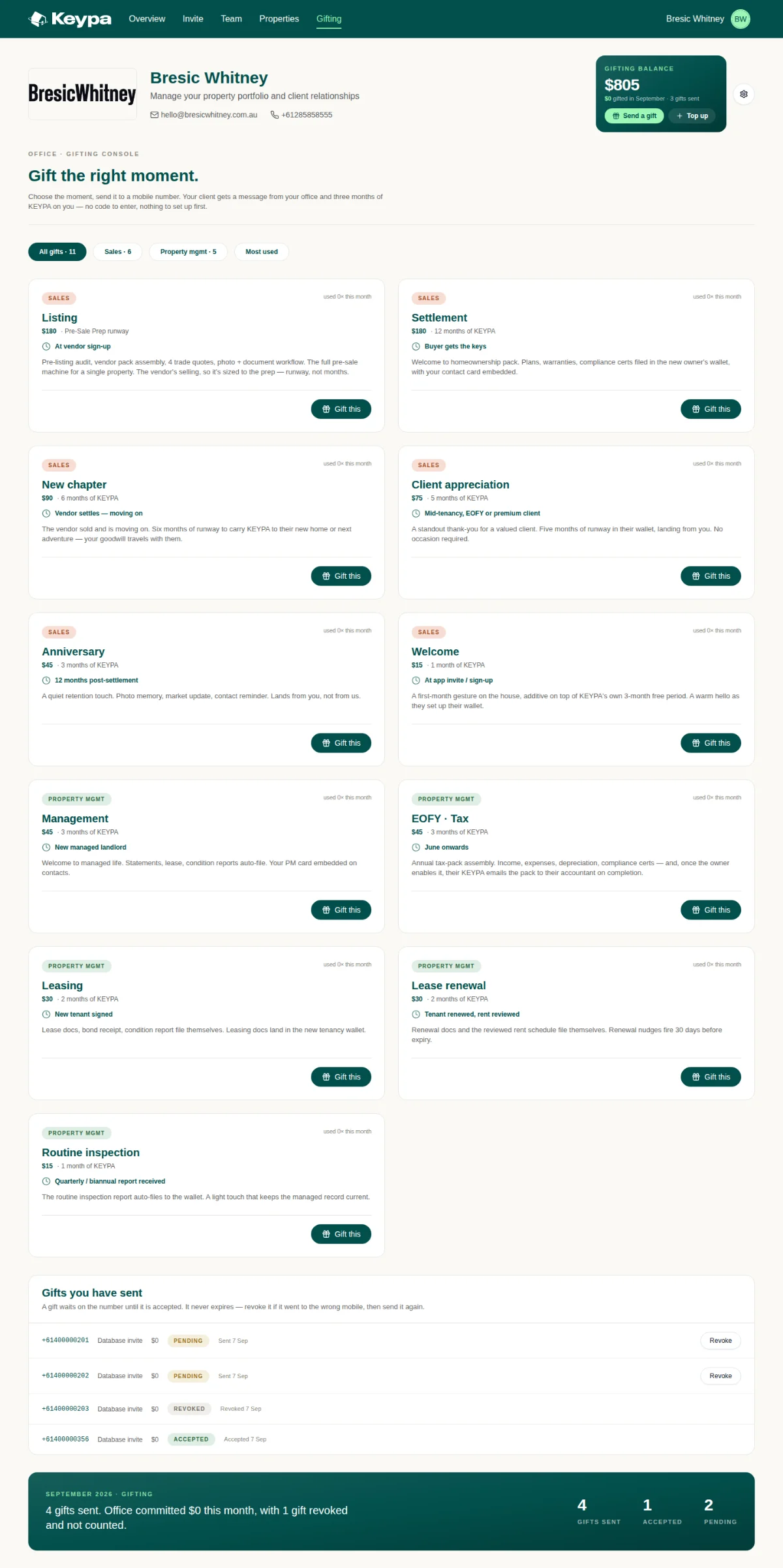
A gift is months of Keypa paid for by the office, sent to a client’s mobile at the moment it means something: a listing, a settlement, a new tenancy, tax time. The client gets a text from your office and nothing to set up. Each card in the catalogue says when to use it and what it costs.

Good to know

Sales runs from Listing and Settlement at $180 down to Welcome at $15. Property management runs from Management and EOFY tax at $45 to Routine inspection at $15.

A gift waits on the number until it is accepted and never expires. Sent it to the wrong mobile? Revoke it and send again; a revoked gift is not counted.

The month’s summary sits at the foot of the page: gifts sent, accepted and pending, and what the office committed.

console · Gifting

Scroll inside the frame to see the whole page.

Settings

How the office looks to a homeowner.

Behind the gear beside your gifting balance. The Brand card comes first because it is what clients see: your logo and display name go into every text, email and the wallet itself, and the card shows you both previews as you change them. Below it, agency details, company address, billing and the bank account.

Admins do this first

Upload the logo. PNG, SVG or JPEG, at least 400 px wide, up to 2 MB. Check the email header preview reads well at small size.

Set the display name to what clients call you. It is the name in the text they receive.

console · Settings

Scroll inside the frame to see the whole page.

Managed homes

What you see, and what stays the owner’s.

When a homeowner gives your office access, you open their home from Properties and read four folders of their wallet, the tasks that concern you, and the address that files documents for you. The rest of the wallet is theirs.

Shared with your office

Compliance

Inspections

Tenancy

Trade

Documents open for reading. Every download is recorded on the grant, so the owner can see what was read and when.

Private to the owner

Money

Ownership

Assets

Neighbourhood

Strata

Never shown to the office. Tasks the owner manages themselves are not shown either, and bookings stay with the owner and their planner.

File documents by email

Each managed home has its own wallet address. Send statements, certificates and inspection reports to it and they file themselves into the right folder. Copy the address from the foot of the page and save it against the property in your own system.

console · Properties · 18 Banksia Street, Epping

Who can do what

Admins run the office. Everyone else works in it.

Every member sees the same five places and the same numbers. The difference is money and membership: only an admin changes the brand, adds people, tops up the balance or touches billing.

In the console

Office admin

Agent or property manager

See the office numbers, recent joins and Invited people

Yes

Yes

Share the office link and text client mobiles

Yes

Yes

Their own link counts to the office too.

Send a gift from the office balance

Yes

Yes

Top up the gifting balance

Yes

No

Request, open and end access to managed homes

Yes

Yes

Add team members by email or from Domain

Yes

No

The roster is visible to everyone.

Change the logo, display name, agency details and billing

Yes

Read only

See their own homes as a homeowner

Where they own one

My properties

A member who also owns a home on Keypa gets a My properties tab.

console · Team · as a property manager

Your first week

Six things, in this order.

Each one takes a few minutes. The order matters because clients see your brand before they see anything else, and your team needs their links before the list goes out.

1

Admin

Set the brand

Upload the logo and set the display name. Read the text-message preview aloud; that is the sentence your clients will get.

Settings · Brand

2

Admin

Add the team

Invite each agent and property manager by email. They get a sign-in and a personal link the moment they are added.

Team · Invite by email

3

Everyone

Put the link where clients look

Download the QR as PNG or SVG for window cards and brochures. Paste the embed code into the website. Add your own link to your email signature.

Invite · Your link and QR code

4

Everyone

Text your client list

Paste the mobiles of past clients and current landlords, check the list, send. Then watch Invited people fill in over the week.

Invite · Invite by mobile

5

Property managers

Ask to see the homes you manage

Request access on each managed home. The owner approves it in their app; from then on statements and reports you email to the wallet address file themselves.

Properties · Request access

6

Everyone

Gift the right moment

Next listing, settlement or new tenancy, send the matching gift to the client’s mobile. Nothing for them to set up, and it lands from your office.

Gifting · Gift this

Words you will see

The console’s vocabulary, plainly.

Short code

The six characters at the end of your office link. It is your office’s part of the link, so every signup through it counts to you.

Invited · Joined · Wallet active

Reached by text or link; has the app; has a home with documents in it. Wallet active is the one to grow.

Not texted

A mobile on your list that the text did not reach. Resend it from the Invited people ledger.

Revoked

An invite or gift you withdrew. Revoked rows stay in the ledger but are not counted.

Referred

A home whose owner joined Keypa through your office.

Managed

A home whose owner has given your office read-only access to four folders of their wallet.

Read-only access

You can open and read shared documents. You cannot add, move, delete or act for the owner, and every download is recorded.

Wallet address

The email address each home has. Anything sent to it files itself into the right folder.

Gift

Months of Keypa paid for by the office and sent to a mobile. Pending until accepted; never expires; revocable while pending.

Gifting balance

The office’s shared credit for gifts. Anyone can spend it; the admin tops it up.

On your phone

The console fits in a pocket.

Open the same address on your phone and everything is there: the numbers, your link, a gift to send from the kerb, and any managed home you need to check on site. Wide tables scroll sideways inside their card.

Overview

A managed home

Keypa

Your home, off your mind.

Screens shown are from the office console review build, September 2026. Names, numbers and addresses on them are sample data.